Showing posts with label beebots. Show all posts

Friday, January 26, 2018

Computer Lab Displays 2018


Hello, internet denizens!

This is just a quick write-up of the new displays in the IT Lab for 2018. I wanted to get this posted before the start of the year has passed me by, as I've had a great reception from staff and students on how the lab looks.

On the door:


This new poster is on the lab door. It helps new parents and students figure out what my lab is: the glass on the door is darkened so it's not easy to peer in and figure it out. I've since added a timetable for the lab as the venue is nearly fully booked already.

Awesome Algorithms, Brilliant BeeBots:


This display features the great free BeeBot instruction cards from TES. I printed the BlueBot over 4 A3s, I've never printed anything at such a scale but it turned out great. The directions also have helped as a reference for students when we work with the BeeBots.

For the first time ever, we are running an experimental extra-mural technology option for Gr 2 and Gr 3. This term we are working exclusively with BeeBots in our new Tech Club time so this board has been referred to often. My students like to use it to show their parents what we have been up to.

STEAM Showcase:


This board looks a bit bare now but the idea is that I will fill the STEAM Showcase with examples of great work. As we work mostly digitally, I didn't have a place to display student work last year. I think this board will help motivate my students when they see examples from their peers being displayed. I used the super, free, STEAM Monster posters on Teachers Pay Teachers.

The Biggest Change to the Lab:

Just before school closed at the end of last year I had asked for wires to be installed in the lab. The idea for these wires originally was to display student work but, after racking my brains the whole holiday, I finally had a better idea.


Right before school opened this term, I had a very diligent student helper who helped me punch holes into about 80 old CDs and DVDs that I sourced from my colleague. We strung these CDs onto colourful yarn and then hung them up all across the lab.


The change has been quite striking and it's charming to see the CDs dancing in the breeze. The new decor has also spurred some conversations with students about why we use CDs for (data storage), why we are using CDs for decoration (becoming obselete) and what we use now instead of CDs (cloud, flash/usb sticks). The older visitors to the lab have been having fun reading the titles of the motley collection of CDs, there are a few old games CDs tucked away in the corners of the room.


The pictures don't quite do it justice, they are quite animated little decorations - especially when the air-conditioning is on!

Thursday, November 16, 2017

Exploring and Tinkering: My first time using Blue-Bots

After a successful proposal, I have been lucky enough to have adopted 12 new 'devices' into my IT Lab:


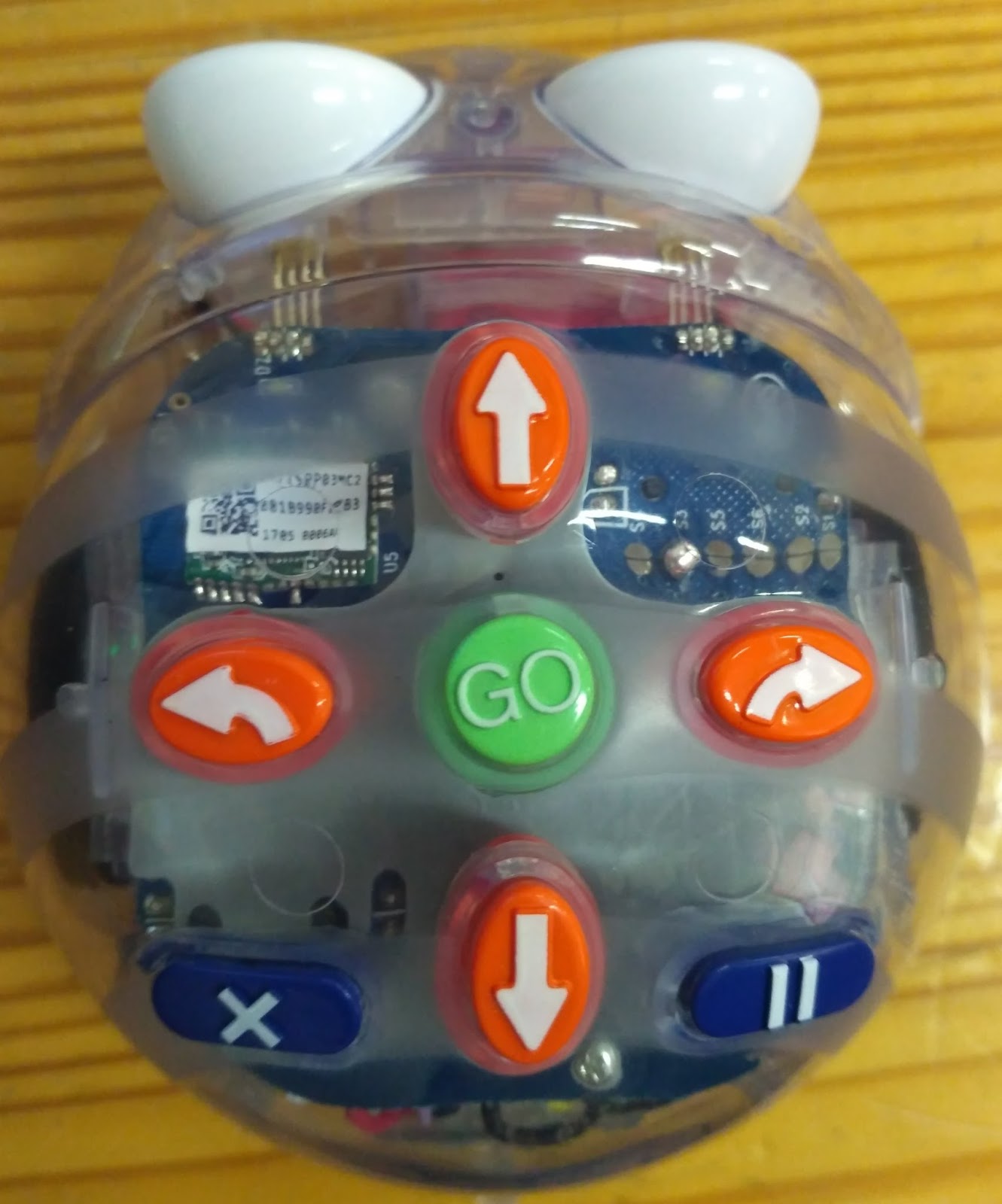
Say hello to the Blue-Bots! They have become, by far, the most exciting thing in the IT Lab (sorry, iPads). Blue-Bots are sturdy little robots with cute expressions and buttons on top.

I had specifically requested the Blue-Bots for a number of reasons:
  • The buttons on top of the robot are the primary input. This is perfect for young students as they need concrete experiences to properly understand Computer Science concepts. 
  • At the same time, the Blue-Bots can later be used with an app via Bluetooth. This gives the robot more versatility at older ages. 45 turns and repeats can be achieved through the app.
  • Clear plastic shell means that my students can see the inner workings of the Blue-Bot. This has utterly fascinated my children and already lead to conversations about motors, batteries, motherboards, speakers, input/output and all sorts of hardware bits.
  • Reliable: Bee-Bots and Blue-Bots have a good reputation for being robust and ideal for my young students and their sticky fingers.

Introduction lesson: Blue-Bots

Exploring

This lesson happens after we've had a lesson on Crazy Characters and algorithms. We sit together on the carpet while I explain these are robots that work using algorithms and remind them what that means. We investigate the bots while they are switched off.  We pass the bots around and ask questions and wonder out loud together. We look at all the parts we can see and discuss how they could work, and what we think the parts do. The Blue-Bots shine in this stage because of the clear plastic shell and how we can wonder about all the inside parts and what they do. This exploring phase is so important as the students gain a better understanding of what the purpose of the bot is rather than just treating it as a toy.


Tinkering

When we have fully mined out all of the possibilities of looking at the Blue-Bots while they are switched off, I remind the students about the benefits of working with a partner while solving puzzles. The best benefit of a partner is that you can always come up with new ideas together (brainstorm). I encourage them to use the pair programming concept of driver/navigator roles in order for them to take turns and for both partners to be actively involved in the learning rather than one just sitting passively. I give the students the hint that the bots use algorithms, and that buttons need to be pressed in a certain order for them to move.

After that, I let them loose in the room with their bot and their partner for most of the lesson. I delibrately don't teach them how the bots work at first. They try the Blue-Bot out on the desks, on the floor, under the desks, on any random surface. Many of them soon figure out that there needs to be a way to clear previous commands, so after a few minutes I bring them back to the carpet to model what to press in order to clean the memory and start with a new algorithm.

As students find a problem, I encourage them to try to solve it. Once a group of students have found a solution, I get them to teach others.The students need this tinkering time with the bots in order to try out their wacky ideas and eliminate what the bot can and cannot do.  If needed, I bring the group to the carpet to deliberately teach a function or correct a misconception.


Next steps?

After the introductory free-roam lesson, the next steps are to give the students some more structured challenges. After the tinkering phase, they feel as if they are much more experienced bot 'programmers' and confidently approach challenges as they now understand how the basic mechanics work.

I plan to involve marching and dance in my follow-up lessons, as my students particularly enjoyed making the bots move in sync with each other. Another option is to get the Blue-Bots to move in shapes such as squares and rectangles, and getting students to record their algorithms before they program them into the bot.

I am pleased to report than a number of the class teachers have been very inspired by the students' enthusiasm and have given their own ideas for future projects. I am so pleased that other teachers see the potential of co-curricular ideas with these fantastic little devices.

Getting your hands on some Blue-Bots

This is a note only for South African technologists, but my school had great success in sourcing bots from a local company called Edit Microsystems. They have been nothing but helpful in shipping and getting the bots couriered to us. We also purchased 2 charging docks, which have been invaluable in giving us as less chaotic charging situation.