Friday, August 19, 2016

Learning with Minetest Part 1: Rolling out Minetest in Pre-Primary


This blog post is part of a series of posts exploring the concept of using the Minetest game as a learning platform in a primary school. Click below to access the other posts:

Learning with Minetest Part 1: Rolling out Minetest in Pre-Primary
Learning with Minetest Part 2: Activities and Aims
Learning with Minetest Part 3: Impact on the Students

As a person who is an educator and has also played Minecraft, it's been obvious to me that the idea of mixing the two concepts together would be hugely successful. A 3D world focused on building is a very suitable game-space to develop many areas of learning. The creation of MinecraftEDU, which has recently been bought and re-released by Microsoft/Mojang, seemed inevitable. The US dollar price-tag for MinecraftEDU wasn't ideal, though I have always been interested in the possibility of bringing Minecraft into my computer lab.

Last week, I stumbled across Minetest. Minetest is a free, open source game which takes it's inspiration heavily from Minecraft. Minecraft itself was first inspired by a game called Infiniminer, we are the sum of our influences, etc. Nobody involved with Minetest makes a profit, the entire game framework is designed so that anyone can create mods for the game and the community shares the development. I wrote a proposal for my school administration which outlines the differences between the two games, which is available here.

Minecraft versus Minetest

In brief, when I brought Minecraft in to test in the lab it behaved sluggishly. The IT technicians had been concerned about setting it up on LAN as they had run into issues before. Modding Minecraft was a tricky thing as it had never been designed for modding. As I mentioned, the fact that it was a paid product also put a damper on the possibility of using it for learning.

Minetest was surprisingly easily for me to set up, in comparison. Even though there is less documentation out there for Minetest (they do have a wiki), I managed to get a server running in very little time at all. The student computers have the IP address saved so that when the server is running on my teacher station they can just enter their username and press Connect. Minetest performs incredibly smoothly, especially compared to Minecraft. A few days after finding it, I still marvel when I open up a world and there's so little lag.

Day 0 - Setting Up

After installing Minetest on a couple of machines to test the local server idea, I invited a dozen kids in to see how the concept would work. It was an after-school hour of utter joy, for them and for me. I was soon shown how much I need to learn about how hosting a server works, but it was also immediately clear how much potential Minetest could have. Something that proved crucial was modifying the config file so that the public lobby of servers was disabled for our students. I want them to only use Minetest locally, that way it is safer, we aren't bogged down by external mods, and they will be less distracted from the learning objectives. I learned how to do that here.

Day 1 - Grade R gets a sneak peek

Today I ran my first few classes through Minetest. I had wanted more time to prepare, but one of the Grade R teachers had mentioned that I had got 'Minecraft' working in the computer lab and the first class was beside itself with excitement. I decided to dive in with explaining how the W key was used for moving forwards, the spacebar for jumping, and the mouse for looking around. Many children had never used the keyboard and mouse in this way so it was a learning curve for them. As I hadn't thought to establish a strict ruleset to enforce digital citizenship, I used the golden rule of treating each other kindly. Next time I will definitely start with a rules and consequences discussion as I have seen on many Minecraft teaching blogs out there.
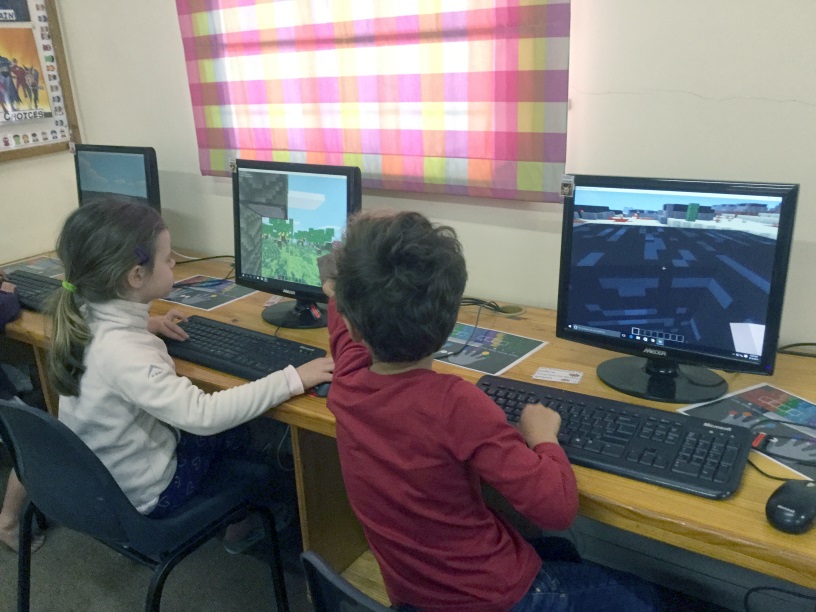
Helping our friend dig out a block.
The Grade R (age 5-6) children responded really well to the experiment. All of the children were soon able to navigate around the landscape, jump over obstacles and follow their friends around the map. Some children were comfortable with beginning to dig and place blocks, which will be the foundations of the building we will do later. All of the children wanted to play again, immediately asking me if we were going to play in their next lesson. This afternoon, a parent came to find me to tell me that her son had already explained about Minetest and how much fun he had in Computers today. It's always great to hear that my ideas are helping students become enthusiastic about their learning.

Exploring our desert world.
Next on the agenda is introducing Minetest to each of my classes, beginning each one with a discussion about the rules. I'm expecting something along the following lines:
  • Use your real name to log in.
  • Leave other people's buildings alone.
  • Treat each other kindly.
I will be using the huge realm of information that has been written for using Minecraft in an educational context, many of the lessons and guides can easily be applied to the Minetest environment even though it isn't as sophisticated. I also want to get my classroom teachers in for a Minetest lesson so that they can let go of their reservations about using such a popular game for learning. If we can harness the platforms that the children are naturally drawn to for the power of good, then I think we'll have done something great.

H finds a warthog.

In the next part of this series, I will be discussing how I went about setting up Minetest for my various classes. This includes the worlds that I used and the activities that I planned. Click below to access part 2:

Wednesday, August 17, 2016

Hero Kids - Tomb of the Lost King


Midnight at the graveyard, the heroes are on the job.

This term, I have gone back to running my Hero Kids club for the Grade 2 and 3 children. I've got a rambunctious group of 6 boys, and we had our first proper session today. I'm running the Tomb of the Lost King module and so far we've had a lot of fun. I'm looking forward to this module as it throws a variety of different themed challenges at the heroes.

I went to the extra effort this time around and cut and glued the paper little minion standees - and even coloured them in! It actually made it much easier to tell the enemy mobs apart, which helped keep track of the HP values. I hope to keep this going through this module, and have already cut and glued the skeleton warriors for later on.

The more that I run RPGs for kids, the more that they impress me. Once they learned to stop fiddling with the GM models and paperwork, this group listened uncharacteristically carefully to the rules and brought forth really original solutions. I soon modeled for them how they could add creative descriptions for what happened to their dice rolls, and they delighted at giving each other ideas for the skeleton-smashing. I once saw a child's face light up when he realised that he could choose to make his character do something cool. The agency that role-playing games give players is something truly special.  

The benefits of RPGs that are easily seen are the creative thinking and problem solving skills. The kids show such utter joy that they can influence a story as it is happening. The collaboration between the players and I becomes stronger as they go on with the games. 

Here is our party line-up:
  • Ugolas the Elf Ranger - he wanted to call his character Legolas but since that's a character already he settled on a similar name
  • Max the Reptile Bladedancer - this child has already talked more in this club than he has the rest of the year... entirely worth it
  • Gluchi the Healer - only character with magic, a challenging child already shining in this club
  • Shadow the Acrobat - youngest child, first one to buy into the method of describing attacks creatively
  • Roben the Archer - the only child who has played before, running same character as last time
  • Scar the Wolf Child - first child that I've run for who has successfully used a special attack without any prompting from me

I foresee great things for this party.

Hero Kids - The Hero Kids Strike Back

Thursday, August 04, 2016

Experimental: Shared Google Slides with Grade 1s


Our Grade 1s were lucky enough to be my new guinea pigs - we created class Number Books using Google Slides! The exciting thing about this activity was that we were able to work in a collaborative environment, our Grade 1s have never done this before. Google Slides was a great first step for them into shared workspaces.

Preparation:

I set the activity up in the following way:

Before the classes happened I created a template Slides for each class, with a front cover and around 20 slides, each numbered clearly. I made all of the slideshows public, so that anyone with the link could access them. I then added the links to our grade Symbaloo so that the students were able to access it. The Symbaloo portal is a bookmark on all of their desktops and they are used to using it to navigate the web.

When the classes arrived, we first of all looked at the Google Slides UI displayed on my projector and talked about parts of it that we recognised from MS Office, such as inserting shapes and the text formatting options. They happily pointed out icons they had remembered from our previous activities. I explained that we would be creating a book together all about numbers.

A selection of pages from our number books.

The next thing that we talked about was the concept of a shared work environment. I gave each slide a number and then assigned a number to each student. Their first instruction was to go to their slide and put their name in the lower text box. We talked about how even though you could see other people working, you needed to be respectful. Assigning a slide to each student worked out really well, we had very little dabbling in other people's spaces and the students were excited but respectful.

My students were incredibly excited to see their classmates' work happening on the left of their screens while they worked in the main part. Most of them got used to the idea of shared space quickly and used this function to share ideas and compliment each other 's work.

Even though the subject material was simple, the number books turned out very well as a test run. The clear allocation of work space was perfect for this age group, just enough collaboration to get them excited but not an overload of new experiences.

The shared slides on the left with their own work in the middle of the screen showed my Gr 1s the value of shared workspaces.

Drawbacks

The primary drawback was incredibly long loading times. Despite my plan for the students to use Symbaloo to access the Slides links, I ended up pre-loading the Google Slides in open browsers on each desktop station. Even with this forethought, it took at least 15 minutes for the slideshows to be ready and loaded. This problem was not caused by the platform but by our school's limited connectivity. Once the browsers were loaded, there were one or two cases of disconnection but they were relatively rare. It was easy to get a student back into the action since it was all hosted online.

Summary

Our students were not able to use the chat or other collaboration functions that are features of the Google platform because we do not yet have individual Google accounts for our students. When this feature is rolled out, the possibilities for future projects become even more popular. I look forward to doing a similar shared slides project but

I am super proud of my Grade 1 students and what they have achieved in their first experience of Google Slides. Below is one of the completed class books.


Sunday, July 31, 2016

Display: Bits and Bytes

In the computer lab we are lucky to have a large, prominent display board. Sometimes it can be a challenge knowing what to put there, and I most recently had student work displayed. With the start of term 3 I decided to spruce things up a bit. This has been a display that I've been wanting to set up for a long time but I finally had all of the parts together to make it work. During the past year the IT technicians have been amazing at keeping outdated and broken bits of hardware aside for me. This is the result:

Bits and Bytes - hardware display
The first challenge was figuring out how to hang the keyboard. Luckily, there is a nail embedded in the wooden frame of the board, and after I wrapped the keyboard cable around it, it managed to hold the weight. The motherboard was also a tricky shape to hang, some of my colleagues suggested a 'picture-frame' arrangement which turned out great. The rest of the bits and bobs secured easily to the cork backing, mostly with drawing pins. 

Parts of the Computer
The display has already drawn curious eyes, especially thanks to the pop-out nature of all the physical pieces. The colourful yellow labels really livened up the place, too. I'm proud of the monitor that I'm created from a screenshot of a student's desktop and some recycled black-printed paper. 

What the display board looks like in the lab.
 I've left a bit of space to the right of the display, in case I'm able to track down a pair of worn-out speakers, earphones or headphones. I've had senior primary boys ask what some of the bits and pieces are. What's a floppy disc? I consider this display a great success.

Thursday, July 14, 2016

Game Review: Everybody's Gone to the Rapture

Game Review: Everybody's Gone to the Rapture
Developers: The Chinese Room

Welcome to Yaughton.
As someone who grew up in the UK, Everybody's Gone to the Rapture feels just like being in a Real English Village. The train station with uniform signage. It always interested me as a child that no matter what train station you went to, they always looked the same. The rainy caravan camp with scheduled activities. The pretty surroundings filled with people with insular, close-minded views. Two pubs and a church within walking distance but not a whole lot else going on. The Keeping Up Appearances houses, complete with slim white telephones. People still being considered outsiders or 'blow-ins' because they've only been living there for 1 or 2 generations... I've had authentic experiences of pretty much all of these things!

Hop on the train to Yaughton

The main story is a good scene-setter, there is a big ominous observatory near the village and we experience events surrounding two of the scientists that work there. It's a pretty straightforward sci-fi plot, and I'll always root for a decent sci-fi story. The real enjoyment for me, though, came from piecing together the inhabitants of the village, their relationships with each other and their trials and tribulations. Despite it being set in a different decade, I was often reminded of J.K. Rowling's adult book, The Casual Vacancy. Both this game and Rowling's novel are character studies, where you slowly figure out how everyone is interconnected. I really appreciate that gaming has come so far as to be compared with literature, even if it's only by me.

The voice acting and music are fantastic, especially given the limitation of not being able to see the characters - all the character interaction that we experience is in flashback. Without even seeing Wendy I could start to picture her as an old, interfering biddy the longer that I listened to her voice. Rhys and Rachel stood out as those rare younger folk of the village and I enjoyed their side-story immensely. They have some great choral music that seems to play along with appropriate story triggers, the music elevates certain important scenes to make them quite poignant. The emphasis on audio to tell the story reminded me of the tradition of excellent radio plays, where the acting needs to be that good so that the listener can tell what's going on. On reflection, I actually listened to Rowling's The Casual Vacancy as an audio book, with an excellent narrator voicing the characters. This is why EGttR and that novel both mirror these themes for me. Kudos to the voice artists and sound team, they really made the game a cut above the rest.

There is a fine old windmill on the hill overlooking Appleton's Farm.
Glowing balls of light

You are shown around the village by a moving, glowing ball of light, which was problematic at times. At one stage my ball of light got stuck in a hedge, leaving me on my own to hopefully trigger the right story-sequences, which are proximity-based. In the final section all of the voice-notes that were supposed to trigger just didn't, leaving the whole thing far more eerie (to be fair, I didn't realise there was supposed to be commentary on what I was seeing until reading forums after but I would have preferred the full experience). In certain sections I wandered around fine and hit the correct story beats, but in one or two places I sadly had to resort to a guide to complete that area's story. Adding some mechanical, game-y elements like objectives, a mini-map or waypoints certainly would have reduced my confusion. Unfortunately, doing this would probably have taken away from the mystical element of the glowing orbs.

The picturesque village and surrounds are absolutely beautiful. I was going to just grab some screenshots available online to demonstrate this but the idea of jumping back in to the game to take my own was exciting! For anyone that really enjoys taking an in-game walk and seeing the sights, EGttR has corn fields, shady forests, windy footpaths and more for you to explore. Gaming tourism at it's finest. If you have a decent rig then the game will be even more stunning, I was only able to play on lowish settings.

Stop by the village church.
Walking simulators?

Walking simulators is the label given, sometimes disparagingly, to games like Everybody Goes to the Rapture. The aim of the game is, yes, to walk around. You stroll around the game and interact with things, usually such as books or audio recordings, which helps unfold a story about the place that you are exploring. You don't get a weapon, which in a first-person video game is near-standard. You don't even get to jump or run very fast. Wikipedia calls EGttR a first-person adventure art game, which is a more appropriate moniker.

Some gamers turn up their noses at the 'art' tagline, saying that games that are trying to be art are pretentious:

"Games are supposed to be fun!" 
"There's supposed to be enemies!" 
"You're supposed to shoot things!" 
"You're supposed to level up!" 

Some of these statements I've found to be less true than others. As someone who rates narrative as the top thing I care about in a game, walking simulators are fantastic. I found that wombling around Yaughton and piecing together a narrative quite fun. If you're the kind of gamer that wouldn't enjoy that, well, just keep on walking.

As someone who has become a fan of of walking simulators, EGttR was unfortunately more like a crawling simulator. The walking speed is incredibly slow. The devs have released a post explaining that there was actually a run button, which I hugely appreciate them writing - it had been forgotten to be emphasised at release, causing some reviewers to really slam the game. Even with the run button, though, I found the default speed entirely too slow. To run you have to hold the key down which becomes tiresome. I understand the developers not wanting anyone to ruin the experience by bunny-hopping around the idyllic English countryside, as we tend to do in first-person titles, but I had to resort to using Cheat Engine to change the movement vales to something a bit less lethargic. They do prevent you running near important story areas, which I respect, in order to make sure you aren't missing anything.

Barbara will be able to help you at the surgery.
So why bother?

How is playing this game better than reading a book or watching a movie with the same premise? This is a common criticism leveled at walking simulators, and I think it's a genre that game developers are getting better and better at exploring. During my own play-through I did grumble about the shortfalls above, but I have now gone on to write this quite robust review. The game made an impact on me. Despite some mechanical reservations, I really enjoyed my time with EGttR. The atmosphere was unique and authentic. When I stepped into the access tunnel near the end, I could almost smell the rainy, cold smell of a similar place from my childhood. I just wish that you could explore more of it - some of the houses are explorable but some are not, leading to some time wasting.

The train station for Yaughton and Tipworth.
I suggest you play Everybody's Gone to the Rapture if you want to be immersed in the sights and sounds of a trip to the 1980's village of Yaughton. Don't forget to pack your wellies.

Thursday, June 30, 2016

Google Certified Educator Level 1

As of today, I'm officially a Google Certified Educator Level 1!

Thanks to my PLN

I discovered the Google certification through my fantastic global PLN (Professional Learning Network) colleagues on Twitter. Earlier this term I began a conscious effort, inspired by the podcaster Chris Nessi and his show House of Ed Tech to improve my professional development. I've had a Twitter account for years but only in the last few months I've started to use hashtags and follow edu-chats. Prior to this I considered Twitter a 'soapbox' platform, but some time and attention has proved that there is some great learning spaces there. I love seeing what teachers are doing and thinking all over the world, and Twitter has been the vehicle to help me digitally meet other educators who are passionate about the same things as I am.

What you need to know about Google Certified Educator Level 1

A quick Google (ha) will reveal that the test-takers are asked to sign an NDA so I can't tell you the exact details of what the exam was like. I admit that at first I under-estimated the difficulty of the test but after some time I figured out that Google are very thorough! I hugely appreciated the interactive, hands-on elements that you experience. The study material that Google provides is well-written and a great tool for professional development, I highly recommend going through it as it guides you through everything you need for the exam.

You will need a webcam as the exam relies on your live feed for proctoring. They do ask you to take a picture with it right before you start, claiming that it is for your certificate, but mine wasn't used for my certificate. I had brushed my hair and everything!

You will also need a stable internet connection. Despite having pretty good home internet for South Africa (10Mbps), the connectivity was a tad problematic. Once, after the connection dipped, the exam portal gave me the error that I was inputting answers for the wrong question! I solved this by closing the tab (despite the exam page protesting) and quickly opening it again. When the exam resumed I was in the right place with no harm done. Although this made my anxiety levels rise, it turned out to be a minor blip.

Overall, I enjoyed the process of studying for and taking the Google exam. I've had a look at the study materials for level 2 and it looks far more in-depth than level 1. Once I can get more experience using Google Apps for Education in the school setting then I think I'll be equipped to tackle level 2.
All official like.

Thursday, June 23, 2016

Making Games in Scratch with Junior Primary


This post marks the end of an 11-week adventure. For the last couple of months I have been running a Coding Club for a group of 8 and 9 year olds. I wrote briefly about this in May but I thought that a more comprehensive wrap-up post would be fun for me and formative for you.

At our school we are lucky enough that each week we have some time set aside for Clubs. In club time our teachers host a variety of interesting, hobby clubs that our Grade 2s and 3s choose from voluntarily. It's a great exercise in student choice, that they don't have to choose an activity based just on what their friends are doing. We encourage them to choose an activity that is something that they personally would really like to do.

My eager bunch of coders had a mixed background - some had participated in Coding Club last term, some had taken part in the Hour of Code we did last year and some had never done any coding before. They were incredibly enthusiastic, particularly because I had framed our club around making games.

An example of some Scratch code created by one of my Gr 3 students.
All About Scratch

We used a freeware program called Scratch for our club. In case you haven't heard of it, Scratch is a hugely popular program where click-and-drag blocks are used to create instructions. It's very kid-friendly even though what you can create can get quite sophisticated. I had never learned coding before becoming a teacher and Scratch is a great introduction to the concepts behind coding, Coding has method and logic attached to it, and Scratch teaches that using method and logic can produce art, games, puzzles and even more. Coding has really become a type of 21st century literacy and Scratch propels that form of literacy forward.

CS First is a fantastic website that creates entire Scratch coding courses around themes. Our limited bandwidth means that I couldn't use the CS First built-in courses that function with the Scratch online site, so I used their course materials and an offline version of Scratch. Click here for instructions and links to what you need to get Scratch running offline. Our coding club was built around the great Gaming module on CS First. Each week I would take the group of students through a Scratch template projected on the board and demonstrate what coding blocks we would be using for that lesson. Then I let them loose on their desktops, sometimes in pairs or on their own depending on the activity.

This is what the Scratch platform looks like in action.

The Benefits of Using Scratch at a Junior Primary level:

I was incredibly impressed with the focus that this group of kids had. Despite their young ages, they managed to grasp the outcome of what I was steering them towards and really went for it. I learned along with them as we created:
  • a racing game for two players
  • a space-themed maze game
  • a platform game where we had to program x/y co-ordinates (!)
  • a bunch of other wacky and weird experiments
A sample of my students' creations.

The Challenges of using Scratch at a Junior Primary level:

There were very few challenges that we found. The offline version worked well and was very stable. 

Navigating file structures: We were able to save our projects into our local drives and retrieve them, and though some of my students still struggle with a Windows file structure we managed fine.

Reading: Literacy levels could be a barrier to enjoying Scratch because although the blocks are colour-coded the students still had to read the functions of the blocks. Using Scratch enhanced my students' vocabularies with words they were not using before like degrees, co-ordinates, sprite, percentage, function ... the list goes on! Coding was so fun that it was great motivation to tackle any tricky reading required.

Expectations: When explaining the concept of coding to my students, many wanted to immediately create Minecraft or Clash of Clans. It took a bit of work to get them to have realistic goals that they could achieve in a few sessions. Once they got the feeling of what they could do with Scratch, they regained their enthusiasm and really started to experiment.

Coding to create a magic spell!
At the end of our last session I awarded certificates to all of the students who took part. They received them with such genuine glee that it really made my day.


I would highly recommend Scratch for anyone who wants to introduce coding to primary-age children. It's offline client really saved us because so many amazing online tools are just not reliable for us yet due to our limited bandwidth. My students loved their creations and will now often choose to play on Scratch during free-time during IT time.